

Contents
- 1 Introduction: Your Journey to Remote Work Starts Here
- 2 What Are Remote Jobs and Why Are They Perfect for Beginners?
- 3 Essential Skills Needed for Remote Jobs
- 4 How to Find Legitimate Remote Job Listings
- 5 Can You Get a Remote Job with No Experience?
- 6 A Day in the Life: What Is a Typical Day Like in a Remote Job?
- 7 Setting Up Your Productive Home Workspace
- 8 Essential Tools for Remote Work Collaboration
- 9 Handling Time Zones and Scheduling in Remote Jobs
- 10 Common Challenges for New Remote Workers (And How to Overcome Them)
- 11 How Performance Is Measured in Remote Roles
- 12 Can Beginners Start Remote Jobs Part-Time?
- 13 Preparing for Your First Remote Job Interview
- 14 Building Skills: Free Resources for Remote Job Training
- 15 Remote Job Categories: Finding Your Perfect Fit
- 15.1 Remote Customer Service Jobs
- 15.2 How to Land Remote Writing Jobs as a Beginner
- 15.3 Virtual Assistant Remote Jobs Training
- 15.4 Remote Data Entry Jobs for Beginners Guide
- 15.5 Remote Tech Support Jobs No Degree
- 15.6 Remote Teaching Jobs Without Certification
- 15.7 How to Start Remote Graphic Design Jobs
- 15.8 Remote Sales Jobs Training for Beginners
- 15.9 Finding Remote Admin Jobs from Home
- 15.10 Remote Project Management Jobs Entry Level
- 15.11 Building Skills for Remote Marketing Jobs
- 15.12 Remote Transcription Jobs for Beginners
- 16 Setting Realistic Expectations for Remote Work Earnings
- 17 The Truth About Remote Work: What Nobody Tells You
- 18 Your Action Plan: Starting Your Remote Career This Week
- 19 Conclusion: Your Remote Work Journey Begins Now
Introduction: Your Journey to Remote Work Starts Here
Have you ever dreamed of working in your pajamas, skipping the daily commute, and having the freedom to work from anywhere? You’re not alone. The remote work revolution has opened doors for millions of people worldwide, and the best part is—you don’t need years of experience to get started.
I remember when I first started exploring remote jobs. I felt overwhelmed by the options and skeptical about whether I could really make it work. But here’s what I learned: remote work isn’t about getting rich overnight. It’s about building real skills, staying consistent, and choosing opportunities that match your strengths.
In this guide, I’ll walk you through everything you need to know about remote jobs for beginners. We’ll cover the skills you need, how to find legitimate opportunities, and what your day-to-day life might look like. Whether you’re a stay-at-home parent, a student, or someone looking to switch careers, this guide will help you take your first steps toward a flexible, fulfilling remote career.
What Are Remote Jobs and Why Are They Perfect for Beginners?
Remote jobs, also known as work from home jobs, online jobs, or telecommute jobs, are positions where you complete your work outside of a traditional office setting. Instead of commuting to a physical workplace, you use your computer and internet connection to collaborate with teams and complete tasks from wherever you choose to work.
The beauty of remote employment is that many positions are designed specifically for entry-level workers. Companies understand that not everyone has years of experience, and they’re willing to train the right candidates who show enthusiasm and commitment to learning.
Why Remote Jobs Are Growing in 2026
The shift to remote work accelerated dramatically in recent years, and it’s not slowing down. Here’s why:
- Technology has made collaboration easier – Video calls, project management tools, and cloud storage mean teams can work together seamlessly from different locations
- Companies save on office costs – Businesses realize they can reduce expenses by hiring remote workers
- Workers demand flexibility – People value work-life balance more than ever, and remote roles deliver that
- Global talent pools – Companies can now hire the best person for the job, regardless of where they live
Essential Skills Needed for Remote Jobs
One of the most common questions I hear is: “What skills do beginners need for remote jobs?” The good news is that most remote positions don’t require advanced degrees or years of specialized training. Instead, they focus on core competencies that you can develop with practice and dedication.
Core Skills Every Remote Worker Needs
Communication Skills
When you’re not in the same room as your colleagues, clear written and verbal communication becomes crucial. You’ll need to express ideas clearly through email, chat messages, and video calls.
Time Management
Working from home requires discipline. You’ll need to manage your schedule, meet deadlines, and stay productive without someone looking over your shoulder.
Technical Proficiency
You don’t need to be a tech expert, but you should be comfortable with:
- Email and calendar tools (Gmail, Outlook)
- Video conferencing (Zoom, Google Meet)
- Basic document creation (Google Docs, Microsoft Word)
- File sharing platforms (Google Drive, Dropbox)
Self-Motivation
Remote work means you’re your own supervisor for much of the day. The ability to stay focused and motivated is essential.
Problem-Solving
When issues arise, you’ll often need to troubleshoot independently before asking for help.
Skills for Specific Remote Job Categories
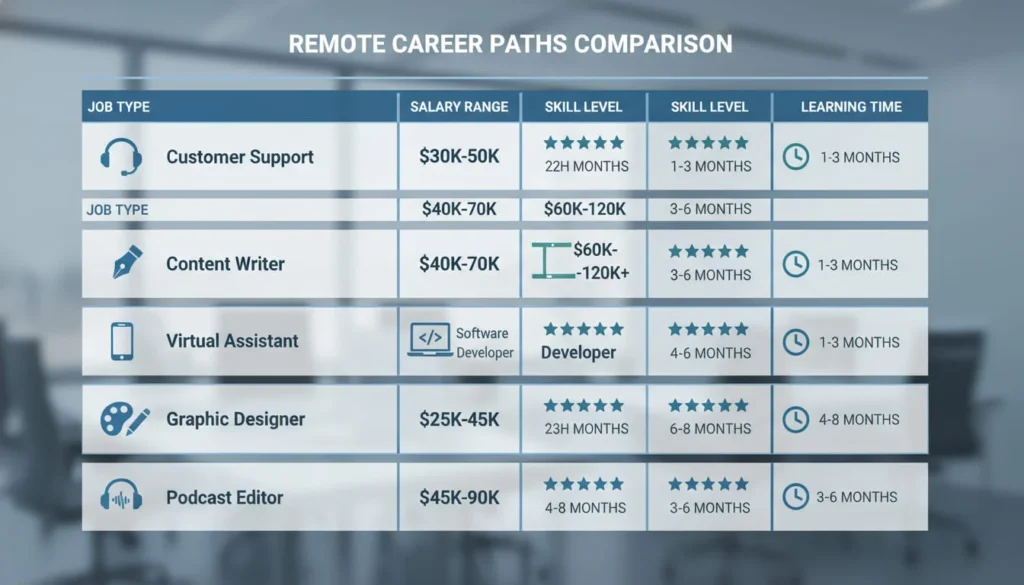
Different types of online jobs require different skill sets. Here’s a breakdown:
| Remote Job Type | Key Skills Required | Learning Time |
|---|---|---|
| Virtual Assistant | Organization, scheduling, email management | 2-4 weeks |
| Customer Service | Communication, patience, product knowledge | 3-6 weeks |
| Data Entry | Typing speed, attention to detail, accuracy | 1-2 weeks |
| Content Writing | Grammar, research, creativity | 1-3 months |
| Social Media Management | Content creation, platform knowledge, analytics | 2-4 months |
| Transcription | Listening skills, typing speed, accuracy | 2-4 weeks |
| Graphic Design | Design software, creativity, visual communication | 3-6 months |

How to Find Legitimate Remote Job Listings
This is where many beginners get tripped up. The internet is full of opportunities, but it’s also full of scams. Let me show you how to separate the real remote jobs from the fake ones.
Trusted Job Boards for Remote Work
General Remote Job Platforms:
- FlexJobs (curated, scam-free listings)
- Remote.co
- We Work Remotely
- Working Nomads
- Remote OK
Industry-Specific Platforms:
- Upwork and Fiverr (freelance remote jobs for newcomers)
- ProBlogger (remote writing jobs)
- Dribble and Behance (remote graphic design jobs)
- Rev and TranscribeMe (remote transcription jobs for beginners)
Company Career Pages: Many companies now have dedicated “Remote Jobs” or “Virtual Careers” sections on their websites. Companies like Amazon, Apple, and Dell regularly hire remote workers.
Red Flags to Watch Out For
Be cautious of listings that:
- Promise unrealistic earnings (“Make $5,000 in your first week!”)
- Require upfront payment for training or equipment
- Have vague job descriptions
- Use unprofessional email addresses
- Pressure you to start immediately without an interview
Pro Tip: Before applying to any company, search their name followed by “scam” or “reviews” to see what others are saying.
Can You Get a Remote Job with No Experience?
Absolutely! Many virtual jobs are specifically designed for entry-level candidates. The key is knowing where to look and how to position yourself.
Best Remote Jobs for Beginners with No Experience
1. Virtual Assistant Roles
Virtual assistant remote jobs often require just basic organizational and communication skills. You’ll help business owners with tasks like scheduling, email management, and data entry.
2. Customer Service Representative
Many companies hire remote customer service workers and provide full training. You’ll answer questions, solve problems, and help customers through phone, chat, or email. Skills needed for remote customer service jobs include patience, clear communication, and basic computer skills.
3. Data Entry Specialist
Remote data entry jobs for beginners are perfect if you’re detail-oriented and can type accurately. These positions involve entering information into databases or spreadsheets.
4. Social Media Moderator
If you’re already comfortable with platforms like Facebook, Instagram, or Twitter, you can moderate comments, respond to messages, and manage online communities.
5. Transcription Work
Listen to audio files and type what you hear. While it requires practice to build speed, many platforms accept beginners and pay per audio minute transcribed.
Entry Level Remote Jobs from Home: Where to Start
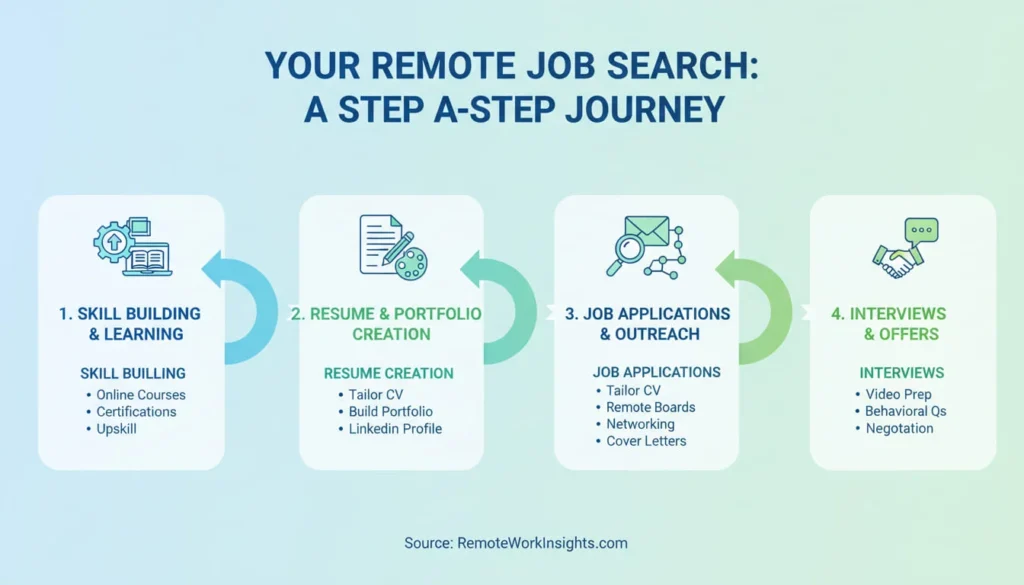
Let me walk you through a realistic approach:
Week 1-2: Build Your Foundation
- Choose 2-3 skills you want to develop
- Take free courses on platforms like Coursera, YouTube, or Skillshare
- Set up professional accounts on LinkedIn and relevant job boards
Week 3-4: Create Your Application Materials
- Write a simple resume highlighting transferable skills
- Create a basic cover letter template
- If applicable, build a small portfolio (even practice projects count)
Week 5 Onward: Start Applying
- Apply to 5-10 remote jobs per week
- Customize each application to the specific role
- Follow up on applications after 1-2 weeks
A Day in the Life: What Is a Typical Day Like in a Remote Job?
Many beginners wonder what working from home actually looks like day-to-day. While it varies by role, here’s a realistic example of a remote customer service representative’s schedule:
8:00 AM – Start workday, check emails and team messages
8:30 AM – Team video call to discuss daily goals
9:00 AM – Begin handling customer inquiries via chat/email
12:00 PM – Lunch break (the flexibility to eat at home saves money!)
1:00 PM – Continue customer support tasks
3:00 PM – Training session on new product features
4:00 PM – Wrap up open cases, update notes
5:00 PM – End of workday
The beauty of remote work is that you can structure your day around your life, not the other way around. Best remote jobs for stay at home parents, for instance, offer flexible schedules that accommodate school pickups and family time.
Setting Up Your Productive Home Workspace
How do I set up a productive home workspace? This is one of the most important questions for remote success. Your environment directly impacts your performance and well-being.
Essential Home Office Elements
1. Dedicated Workspace
Even if it’s just a corner of your bedroom, having a designated work area helps your brain switch into “work mode.”
2. Reliable Technology
- A functional computer or laptop
- Stable internet connection (minimum 10 Mbps)
- Headset with microphone for clear calls
- Webcam (often built into laptops)
3. Ergonomic Setup
- Comfortable chair that supports your back
- Desk at the right height
- Screen at eye level to prevent neck strain
4. Good Lighting
Natural light is ideal, but a good desk lamp works too. Proper lighting reduces eye strain during long work hours.
5. Minimal Distractions
If possible, choose a quiet area away from high-traffic zones in your home.
Budget-Friendly Workspace Tips
You don’t need to spend thousands. Here are affordable alternatives:
- Use a sturdy kitchen table as a desk
- Prop up your laptop on books to achieve proper screen height
- Use a cushion for back support if you don’t have an ergonomic chair
- Download free productivity apps instead of expensive software

Essential Tools for Remote Work Collaboration
What tools are essential for remote work collaboration? The right tools make remote work seamless and efficient. Here’s what you’ll commonly use:
Communication Tools
- Slack – Team messaging and file sharing
- Microsoft Teams – Video meetings and collaboration
- Zoom – Video conferencing
- Google Meet – Virtual meetings
Project Management
- Trello – Visual task boards
- Asana – Project tracking
- Monday.com – Workflow management
File Storage & Sharing
- Google Drive – Cloud storage and collaboration
- Dropbox – File syncing and sharing
- OneDrive – Microsoft’s cloud solution
Time Tracking
- Toggl – Simple time tracking
- Clockify – Free time tracking tool
- Hubstaff – Time tracking with screenshots
Most companies provide training on their specific tools, so don’t worry if you haven’t used all of these before.
Handling Time Zones and Scheduling in Remote Jobs
How do remote jobs handle time zones and scheduling? This is a legitimate concern, especially if you’re working for a company in a different time zone.
Common Scheduling Approaches
Fixed Hours
Some remote positions require you to work specific hours that overlap with your team or serve customers in particular time zones. For example, a customer service role might require availability from 9 AM-5 PM EST.
Flexible Hours
Other roles let you choose when you work as long as you meet deadlines. Remote project management jobs entry level positions sometimes offer this flexibility.
Asynchronous Work
Some teams operate asynchronously, meaning you don’t need to be online at the same time as everyone else. You complete your tasks on your schedule and communicate through recorded messages and emails.
Tips for Managing Different Time Zones
- Use world clock tools or apps to track team members’ time zones
- Clearly communicate your availability hours
- Schedule meetings at times that work for everyone
- Record important meetings for those who can’t attend live
- Use scheduling tools like Calendly to automate meeting bookings
Common Challenges for New Remote Workers (And How to Overcome Them)
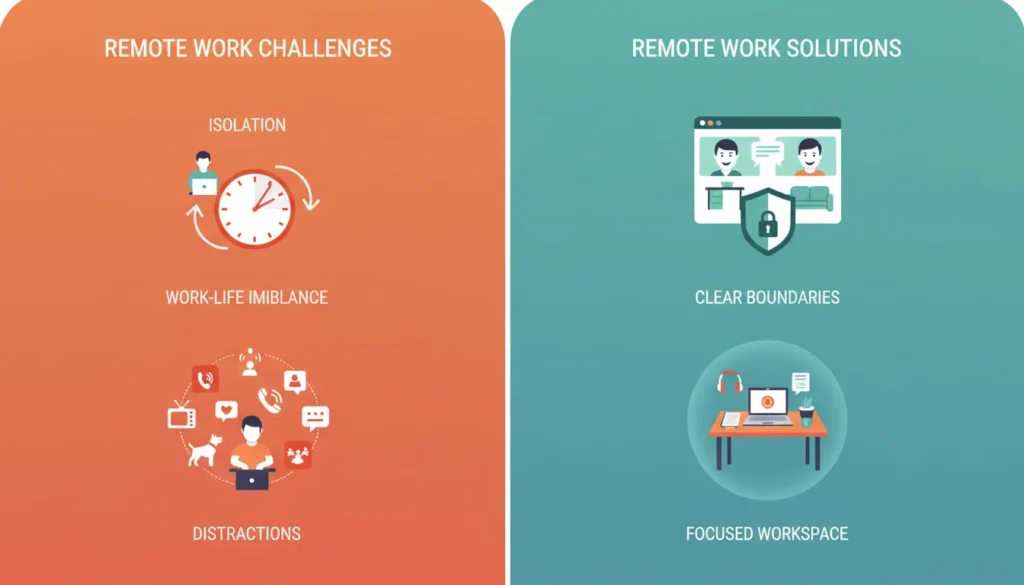
What are common challenges for new remote workers? Let’s be honest—remote work isn’t always easy, especially when you’re just starting out. Here are the most common struggles and practical solutions:
Challenge 1: Isolation and Loneliness
The Problem: Working alone all day can feel isolating.
The Solution:
- Schedule virtual coffee chats with colleagues
- Join online communities for remote workers
- Work from coffee shops or coworking spaces occasionally
- Maintain social activities outside of work
Challenge 2: Work-Life Balance
The Problem: When your home is your office, it’s hard to “leave work.”
The Solution:
- Set strict start and end times
- Create a shutdown ritual (close laptop, tidy desk)
- Change clothes after work to signal the day is done
- Use a separate work phone or computer if possible
Challenge 3: Distractions at Home
The Problem: Household chores, family members, pets, and TV can interrupt your focus.
The Solution:
- Communicate your work hours to family
- Use noise-canceling headphones
- Try the Pomodoro Technique (25 minutes focused work, 5-minute break)
- Keep your workspace clean and organized
Challenge 4: Communication Gaps
The Problem: Misunderstandings happen more easily when you’re not face-to-face.
The Solution:
- Over-communicate rather than under-communicate
- Use video calls for complex discussions
- Ask clarifying questions
- Document important decisions in writing
Challenge 5: Staying Motivated
The Problem: Without external accountability, productivity can slip.
The Solution:
- Set daily goals and track progress
- Reward yourself for completing tasks
- Join accountability groups or find a work buddy
- Remember why you chose remote work in the first place
How Performance Is Measured in Remote Roles
How is performance measured in remote roles? This question matters because you want to know what’s expected of you. Unlike traditional offices where managers can see you working, remote performance focuses on results.
Common Performance Metrics
For Customer Service:
- Number of tickets resolved
- Customer satisfaction scores
- Response time
- Quality of interactions
For Content Writers:
- Number of articles completed
- Quality scores from editors
- Adherence to deadlines
- Engagement metrics (if applicable)
For Virtual Assistants:
- Tasks completed on time
- Accuracy of work
- Client satisfaction
- Responsiveness to requests
For Data Entry:
- Accuracy rate
- Speed (entries per hour)
- Completion of assigned volume
The key takeaway? Focus on delivering quality work on time, and communicate proactively if issues arise.
Can Beginners Start Remote Jobs Part-Time?
Yes! Can beginners start remote jobs part time? Absolutely, and it’s often the smartest way to begin. Remote jobs for students part time and other flexible positions are widely available.
Benefits of Starting Part-Time
1. Lower Risk
Keep your current income source while testing remote work.
2. Skill Building
Learn and improve without the pressure of relying on remote income entirely.
3. Schedule Flexibility
Work around classes, childcare, or other commitments.
4. Multiple Income Streams
Some people combine several part-time remote jobs to create full-time income.
Where to Find Part-Time Remote Opportunities
- Freelance platforms: Upwork, Fiverr, Freelancer
- Part-time job boards: FlexJobs, Indeed (filter for part-time remote)
- Gig economy apps: Rev (transcription), Respondent (research studies)
- Virtual tutoring: VIPKid, Tutor.com, Chegg Tutors
Real Example: Sarah, a college student, started with 10 hours per week doing remote data entry. After three months, she added freelance social media management for a local business. Within a year, she was earning enough to cover her living expenses while maintaining her class schedule.
Preparing for Your First Remote Job Interview
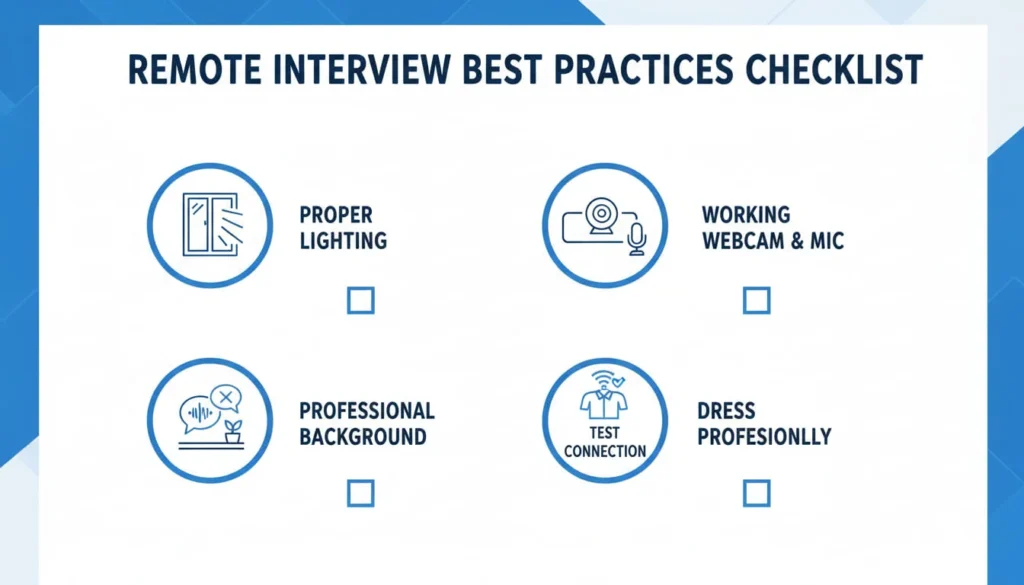
How do I prepare for a remote job interview? Great question! Remote interviews have their own unique considerations.
Technical Preparation
Before the Interview:
- Test your internet connection
- Ensure your webcam and microphone work properly
- Download any required software (Zoom, Skype, etc.)
- Find a quiet, well-lit space
- Charge your devices and have backups ready
Common Remote Interview Questions
Be ready to answer:
- “Why do you want to work remotely?”
- “How do you stay organized and motivated?”
- “What’s your home office setup like?”
- “How do you handle distractions while working from home?”
- “Describe a time you solved a problem independently.”
- “What remote collaboration tools have you used?”
How to Stand Out
- Show your workspace on camera to demonstrate you’re prepared
- Share specific examples of self-discipline and time management
- Ask about team communication and collaboration practices
- Express genuine enthusiasm for the company and role
- Follow up with a thank-you email within 24 hours
Building Skills: Free Resources for Remote Job Training
What free resources help build remote job skills? You don’t need expensive courses to prepare for remote work. Here are valuable free resources:
General Skills
Coursera – Free courses from universities on business, communication, and tech
YouTube – Tutorials on virtually every remote work skill
LinkedIn Learning – One-month free trial with thousands of courses
Google Digital Garage – Free marketing and digital skills training
Specific Remote Job Skills
For Virtual Assistants:
- Free VA training on YouTube
- HubSpot’s free CRM certification
- Google Calendar and Gmail tutorials
For Writers:
- Copyblogger blog for writing tips
- Hemingway Editor for improving clarity
- Grammarly free version for grammar checking
For Graphic Designers:
- Canva Design School (free)
- Adobe Creative Cloud tutorials on YouTube
- Dribbble for inspiration and learning
For Tech Support:
- CompTIA free resources
- Microsoft Learn free modules
- Apple Support training videos
For Transcription:
- Free typing tests and games to improve speed
- YouTube tutorials on transcription best practices
Platform-Specific Training
Many platforms offer free training:
- Upwork: Success guides and video tutorials
- Amazon (for remote customer service): Full paid training programs
- Rev (transcription): Style guides and tutorials
Remote Job Categories: Finding Your Perfect Fit
Let’s explore different types of remote careers in more detail so you can identify what might work best for you.
Remote Customer Service Jobs
Skills needed for remote customer service jobs include empathy, patience, and problem-solving abilities. You’ll help customers through phone, email, or chat.
Average Earnings: $12-$18 per hour for beginners
Best For: People who enjoy helping others and have good communication skills
How to Start: Apply directly to companies like Amazon, Apple, or Convergys
How to Land Remote Writing Jobs as a Beginner
Remote writing jobs can include blog posts, articles, product descriptions, or marketing copy.
Average Earnings: $15-$50+ per article for beginners
Best For: Creative individuals with strong grammar and research skills
How to Start: Create sample articles, join content platforms like Contently, or pitch to small businesses
Virtual Assistant Remote Jobs Training
Virtual assistants handle administrative tasks like email management, scheduling, social media posting, and customer communication.
Average Earnings: $15-$25 per hour for beginners
Best For: Organized, detail-oriented multitaskers
How to Start: Take a free VA course, create a service package, market on platforms like Belay or Time Etc.
Remote Data Entry Jobs for Beginners Guide
Data entry involves inputting information into spreadsheets, databases, or systems.
Average Earnings: $10-$15 per hour for beginners
Best For: Detail-oriented individuals who can maintain focus
How to Start: Apply on job boards like Indeed or specialized platforms like Clickworker
Remote Tech Support Jobs No Degree
Help customers troubleshoot technical issues with software or hardware.
Average Earnings: $14-$22 per hour for beginners
Best For: Tech-savvy problem solvers with patience
How to Start: Get free certifications from CompTIA or Google, apply to companies like Apple or Dell
Remote Teaching Jobs Without Certification
Teach English, tutor students, or create online courses.
Average Earnings: $12-$25 per hour for beginners
Best For: Patient communicators who enjoy education
How to Start: Platforms like Cambly, Palfish, or Outschool accept teachers without formal certification
How to Start Remote Graphic Design Jobs
Create visual content like logos, social media graphics, or marketing materials.
Average Earnings: $20-$50+ per project for beginners
Best For: Creative individuals with an eye for design
How to Start: Learn Canva or Adobe tools, build a portfolio with practice projects, join platforms like 99Designs
Remote Sales Jobs Training for Beginners
Sell products or services through phone, email, or video calls.
Average Earnings: $30,000-$60,000 per year (often includes commission)
Best For: Persuasive communicators who are comfortable with rejection
How to Start: Look for SDR (Sales Development Representative) entry-level positions with training
Finding Remote Admin Jobs from Home
Administrative assistants handle office tasks, scheduling, documentation, and support.
Average Earnings: $15-$20 per hour for beginners
Best For: Organized, professional communicators
How to Start: Highlight transferable skills from any customer-facing role, apply to corporate remote admin openings
Remote Project Management Jobs Entry Level
Coordinate projects, track progress, and facilitate team communication.
Average Earnings: $18-$25 per hour for entry-level
Best For: Organized leaders who can juggle multiple tasks
How to Start: Get a free project management certification, learn tools like Trello or Asana, apply for junior PM roles
Building Skills for Remote Marketing Jobs
Digital marketers manage social media, email campaigns, content strategy, and analytics.
Average Earnings: $15-$30 per hour for beginners
Best For: Creative, analytical individuals comfortable with technology
How to Start: Take Google’s free Digital Marketing certificate, build a portfolio through volunteer work
Remote Transcription Jobs for Beginners
Listen to audio recordings and type them into text documents.
Average Earnings: $10-$25 per audio hour (varies by accuracy and speed)
Best For: Strong listeners with excellent typing skills
How to Start: Sign up for platforms like Rev, TranscribeMe, or GoTranscript
Setting Realistic Expectations for Remote Work Earnings
Let’s talk honestly about money. One of the biggest mistakes beginners make is having unrealistic income expectations.
First Month Reality Check
What to Expect:
- Part-time earnings: $200-$800
- Full-time entry-level: $1,500-$2,500
- Freelance (building): $100-$500
Factors That Affect Earnings:
- Time invested (hours per week)
- Your skill level
- Type of remote work
- Whether you’re employee or freelancer
- Your location (some companies adjust for cost of living)
6-Month Progression (Typical Path)
| Timeline | Skill Level | Potential Earnings |
|---|---|---|
| Month 1-2 | Learning basics | $200-$600/month |
| Month 3-4 | Building confidence | $600-$1,500/month |
| Month 5-6 | Developing expertise | $1,500-$3,000/month |
| Month 12+ | Experienced | $3,000-$5,000+ /month |
Note: These are realistic ranges for dedicated individuals, not guarantees.
Growing Your Remote Income Over Time
Strategies for Increasing Earnings:
- Specialize in a high-demand niche
- Build a strong portfolio or track record
- Ask for raises based on performance
- Add complementary skills
- Take on more responsibility
- Move from hourly to project-based pricing (often pays better)
- Build long-term client relationships for steady work
The Truth About Remote Work: What Nobody Tells You
Before we wrap up, I want to share some honest insights about remote work that you won’t find in most articles.
It’s Not Always Glamorous
Those Instagram photos of people working from beaches? That’s not everyday reality. Most remote workers sit at home desks, wear comfortable clothes, and deal with regular work challenges.
Discipline Is Everything
Freedom requires responsibility. If you can’t manage your time without supervision, remote work will be incredibly difficult.
Loneliness Is Real
Even introverts can feel isolated. You’ll miss casual office conversations and human connection.
Career Growth Takes Effort
You have to be more proactive about networking, skill development, and visibility when you’re not in an office.
The Good News
Despite these challenges, most remote workers wouldn’t trade their flexibility for anything. With the right mindset and strategies, remote work offers an incredible quality of life.
Your Action Plan: Starting Your Remote Career This Week
Let me give you a practical, step-by-step plan to get started:
This Week
Day 1-2:
- Choose 3 types of remote jobs that interest you
- Research skill requirements for each
- Create accounts on LinkedIn and 2-3 job boards
Day 3-4:
- Take one free introductory course related to your chosen field
- Set up a basic home workspace
- Write your resume highlighting transferable skills
Day 5-7:
- Apply to 5-10 entry-level remote positions
- Join 2-3 online communities for remote workers
- Start building a simple portfolio (even with practice projects)
Next 30 Days
- Apply to 10-15 remote jobs per week
- Continue skill development (30 minutes daily)
- Network with others in your field
- Track your applications and follow up
- Refine your resume based on feedback
The Most Important Advice
Start before you feel ready. You’ll learn more from one real remote job than from months of preparation. Take the leap, learn as you go, and trust that you’ll figure it out.
Conclusion: Your Remote Work Journey Begins Now
Starting your remote career might feel overwhelming, but remember—every successful remote worker was once exactly where you are now. They had the same questions, the same doubts, and the same excitement about possibility.
The difference between those who succeed and those who don’t isn’t talent or luck. It’s consistency, willingness to learn, and realistic expectations.
You don’t need to know everything today. You just need to take one small step forward. Whether that’s updating your resume, taking a free course, or applying to your first remote job, action creates momentum.
The best remote jobs for beginners are the ones you actually apply for. The best time to start building skills is right now. And the best way to overcome fear is to do the thing that scares you.
Your dream of working from home, having flexible hours, and building a career on your own terms is absolutely achievable. It won’t happen overnight, but with patience, persistence, and the strategies in this guide, you’re well on your way.
Start learning today. Build skills step by step. Your remote career is waiting.
About StartEarners.online: We’re dedicated to helping beginners learn how to earn online the right way—no hype, no false promises, just honest guidance and realistic strategies for building sustainable income streams.





I want to do a remote work job. I can get a job. I am intelligent and a motivational speaker.