

Let me paint you a picture.
It’s Wednesday afternoon. You’ve already had two Zoom calls, answered 14 emails, and somehow lost an hour trying to resize an image for social media. Sound familiar?
I’ve been there. Heck, I lived there.
For years, I wore busyness like a badge of honour. “Look at me,” I’d say. “I’m drowning in tasks. Must mean I’m important.” Spoiler alert: it didn’t mean I was important. It meant I was inefficient.
Then I discovered AI tools for beginners.
Not the scary kind that requires coding. Not the expensive kind that demands a corporate budget. I’m talking about simple, friendly apps that feel like having a tiny intern who never sleeps, never complains, and doesn’t steal your snacks.
By the way, I’m not a tech wizard. I’m a regular person who once accidentally deleted an entire folder thinking it was a shortcut. If I can use these tools, trust me—so can you.
Let’s dive in. Here are 7 AI tools for beginners that will save you 10+ hours every week. No exaggeration. No fluff. Just results.
Contents
- 1 Why Most Beginners Waste Time (Without Realizing It)
- 2 The 7 AI Tools That Changed My Work Week Forever
- 3 How These 7 AI Tools for Beginners Save 10+ Hours (The Math)
- 4 Expert-Backed Tips to Maximize AI Tools for Beginners
- 5 Frequently Asked Questions (Because You’re Smart to Ask)
- 6 My Honest, Unfiltered Take
- 7 Your Turn – Let’s Talk!
Why Most Beginners Waste Time (Without Realizing It)
Before we get to the good stuff, let’s talk about the elephant in the room.
You’re probably wasting hours on tasks that could be automated. Emails. Scheduling. Note-taking. Basic design. Repetitive typing. These aren’t hard tasks—they’re just many tasks.
Think of your brain like a smartphone battery. Every tiny task drains a little more juice. By 3 PM, you’re running on 12% and praying for a charger.
Here’s the truth nobody tells you: you don’t need to work harder. You need to delegate smarter.
And the best part? These AI tools for beginners are basically free, ridiculously simple, and will make you feel like a superhero.
Let’s meet your new digital sidekicks.
The 7 AI Tools That Changed My Work Week Forever
I’m ranking these based on time saved and beginner-friendliness — not how fancy they sound. No gatekeeping here.

1. ChatGPT – Your 24/7 Writing Assistant
Okay, I know. You’ve heard of ChatGPT. But have you actually used it to claw back your time?
Here’s a personal example.
Last month, I needed to write 15 cold emails for a collaboration. Normally, that’s a two-hour slog of overthinking every comma. Instead, I typed into ChatGPT:
“Write 5 short, friendly cold emails for a collaboration in the productivity niche. Keep each under 50 words. Add a question at the end.”
Boom. Fifteen seconds later, I had drafts. I customised three words per email and hit send. Total time: 12 minutes.
Time saved per week: ~4 hours
Why beginners love it:
- Free version is powerful enough.
- Works like texting a smart friend.
- You can ask it to “explain like I’m ten”.
Pro tip: Be weirdly specific. Instead of “write a caption”, try “write a funny Instagram caption for a coffee shop that just ran out of oat milk.”
2. Otter.ai – The Meeting Ninja
Raise your hand if you’ve ever sat through a one-hour meeting and remembered nothing. 🙋♀️
Otter.ai is like hiring a stenographer who works for zero dollars. You invite it to your Zoom, Google Meet, or even in-person meeting (via phone mic), and it transcribes everything in real time. Then it sends you a summary with bolded action items.
I used to take frantic notes while pretending to listen. Now I just… listen. Otter handles the rest.
Time saved per week: ~2.5 hours (assuming 3–4 meetings)
Best part: Free for 300 minutes/month. That’s a lot of meetings you can mentally check out of.
Honestly? If you attend even two meetings a week, this tool is non-negotiable.
3. Canva AI (Magic Write + Text to Image)
I have the artistic ability of a sleepy potato. My handwriting looks like a ransom note. Graphic design? Forget it.
Enter Canva’s AI tools.
You type something like “professional LinkedIn banner for a freelance writer — calm blues, book icon, no clutter”, and within seconds… it exists. No layers. No fonts. No panic.
Last week, I needed a thumbnail for a video. Normally that’s a 90-minute spiral. With Canva AI? Eleven minutes. Including the time it took to find my reading glasses.
Time saved per week: ~2 hours
Perfect for social media graphics, YouTube thumbnails, flyers, resumes, and presentations.
Beginner-friendly rating: 11/10. It’s like training wheels for design.

4. Grammarly – The Ghost Editor
Let me embarrass myself.
Before Grammarly, I once sent an email to a client that said, “I look forward to working with your team. “Apostrophe catastrophe. The client didn’t fire me, but I felt my soul leave my body.
Grammarly’s free AI catches typos, awkward phrasing, and even tone. Are you coming off as angry? Too excited? Like a robot that just learned sarcasm? Grammarly gently waves a flag.
Time saved per week: ~1.5 hours (no more re-reading everything five times)
Bonus: It works everywhere — email, Google Docs, Slack, even your Twitter drafts.
Funny story: My partner once used Grammarly to check a text she sent me. It suggested changing “K” to “Sounds good!” She still uses “K” out of spite. Some things AI can’t fix.
5. Copy.ai – Cure for Writer’s Block
Staring at a blank screen is its own special kind of torture.
Copy.ai is like having a chatty, slightly chaotic copywriter in your pocket. Give it a topic — say, “eco-friendly water bottles” — and it spits out 10 Instagram captions, 5 email subject lines, and a LinkedIn post about saving turtles.
Most will be decent. Some will be hilarious. One or two will be absolute gold.
Time saved per week: ~1.5 hours (for content creation)
Best for: Social media posts, product descriptions, ad copy, blog outlines, and brainstorming.
Real example: I used Copy.ai to write an Etsy product description for a friend. She sold out in three days. Coincidence? Maybe. But I’m still taking credit.
6. Remove.bg – Delete Backgrounds in One Click
Have you ever tried to remove a photo background in free software? It’s like cutting a circle out of paper with a spoon.
Remove.bg is stupidly simple. Upload a photo. One second later, the background was gone. Just the person, product, or pet remains. No green screen. No manual outlining.
Time saved per week: ~1 hour (especially if you edit photos often)
Cost: Free for low-res images. Paid for HD. Honestly? The free version works for 90% of what I need.
Use case: team headshots, product photos for eBay or Poshmark, profile pictures, and thumbnails.
7. Notion AI – Your Second Brain on Steroids
Notion alone is great. Notion with AI? Now we’re talking.
Notion AI can summarise long notes, fix grammar, translate text, or turn a rambling paragraph into a clean to-do list. It lives inside your workspace, so you don’t need to jump between apps.
Here’s how I use it: After a messy brainstorming session, I dump everything into Notion — bullet points, half-sentences, random ideas. Then I click “Summarise” and boom. Organised chaos.
Time saved per week: ~1 hour
Beginner tip: Start with a simple “To-Do List” template. Don’t try to build Rome on day one. Rome wasn’t organised in an afternoon either.
How These 7 AI Tools for Beginners Save 10+ Hours (The Math)
Let’s do the math, because I’m a nerd like that.
| Tool | Time Saved / Week |
|---|---|
| ChatGPT | 4 hours |
| Otter.ai | 2.5 hours |
| Canva AI | 2 hours |
| Grammarly | 1.5 hours |
| Copy.ai | 1.5 hours |
| Remove.bg | 1 hour |
| Notion AI | 1 hour |
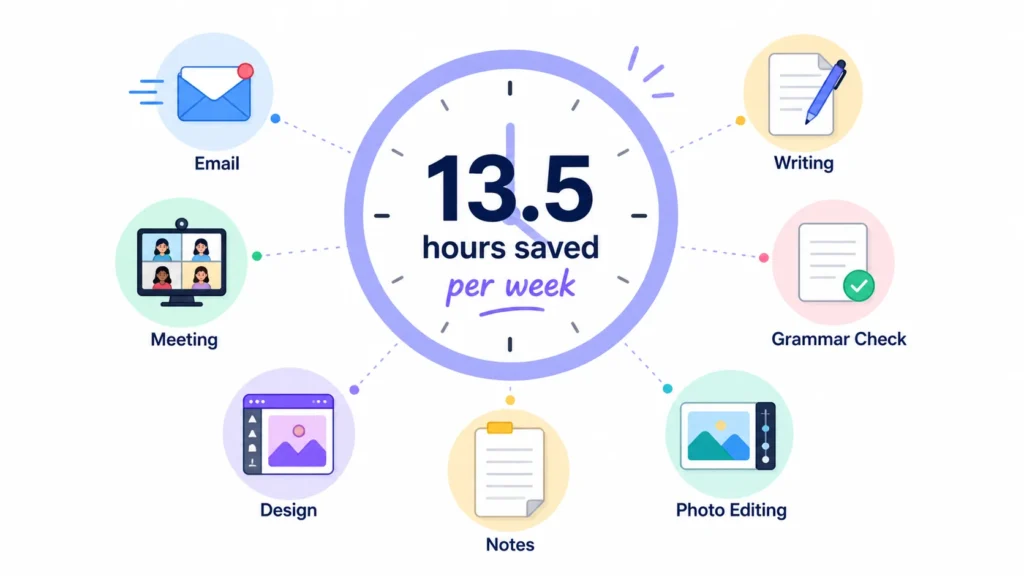
| Total | 13.5 hours |
That’s more than a full workday. Every week.
Imagine what you could do with an extra day. Sleep in. Start a hobby. Call your mom. Binge that show everyone keeps mentioning at the water cooler.
Time is the only thing you can’t buy more of. These tools help you steal it back.
Expert-Backed Tips to Maximize AI Tools for Beginners
Listen, I’ve made every mistake possible so you don’t have to.
Tip #1: Proofread everything.
AI is brilliant but not perfect. It might invent facts or get a little too creative. Treat it like a super-smart intern — great for drafts but bad for final sign-off without human eyes.
Tip #2: Be specific.
“Write an email” = garbage. “Write a short, friendly follow-up email for a late invoice, under 80 words, not aggressive” = gold.
Tip #3: Start with free versions.
So many beginners buy premium plans out of FOMO. Don’t. Start free. Upgrade only when you hit a limit that genuinely annoys you.
Tip #4: Have fun with it.
Seriously. Ask AI to rewrite your grocery list as a poem. Generate a picture of a cat wearing tiny glasses. The more you play, the better you get.
Frequently Asked Questions (Because You’re Smart to Ask)
Q: Are these AI tools for beginners really free?
A: Most have generous free tiers. ChatGPT (free), Otter (free 300 min/month), Canva (free with AI limits), Grammarly (free version rocks), and Remove.bg (free low-res). You can absolutely save 10+ hours without spending a dime.
Q: Which one should I try first?
A: If you write anything — emails, posts, messages — start with ChatGPT. It’s the Swiss Army knife of AI. You’ll see results in 10 minutes.
Q: Will AI make me lazy?
A: No. It’ll make you efficient. There’s a difference. Laziness is avoiding work. Efficiency is doing the same work better and faster so you can focus on what actually matters.
Q: Can I use these on my phone?
A: Yes. Every single tool listed has a mobile app or mobile-friendly website. You can save time from anywhere — even in line for coffee.
My Honest, Unfiltered Take
Look, I was sceptical too.
I rolled my eyes at “AI will change your life” articles for years. But after tracking my own time for three months, I can say this with confidence: these 7 AI tools for beginners saved me over 10 hours every single week.
That’s 40 hours a month. That’s 480 hours a year.
Do you know what you could do with 480 extra hours? Learn guitar. Write a book. Start a side hustle. Sleep. Just… breathe.
You don’t need to be a tech genius. You don’t need to spend money. You just need to start.
Pick one tool from this list. Use it for a week. Then add another. Slow and steady wins the race — and saves the sanity.
Your Turn – Let’s Talk!
Now I want to hear from you.
Have you tried any of these AI tools for beginners? Did one absolutely save your bacon on a tight deadline? Or are you still on the fence, worried you’ll mess it up?
Drop a comment below with your biggest time-wasting task. I’ll personally reply with which AI tool you should try first. No judgement. No tech-shaming. Just real talk from someone who’s been there.
And hey — did this post help you? Share it with a friend who still prints emails “just in case”. They need this more than you know.
Until next time, work smarter, laugh often, and let the robots handle the boring stuff.